Server-Side Tracking for Google Ads and Meta: What It Actually Recovers
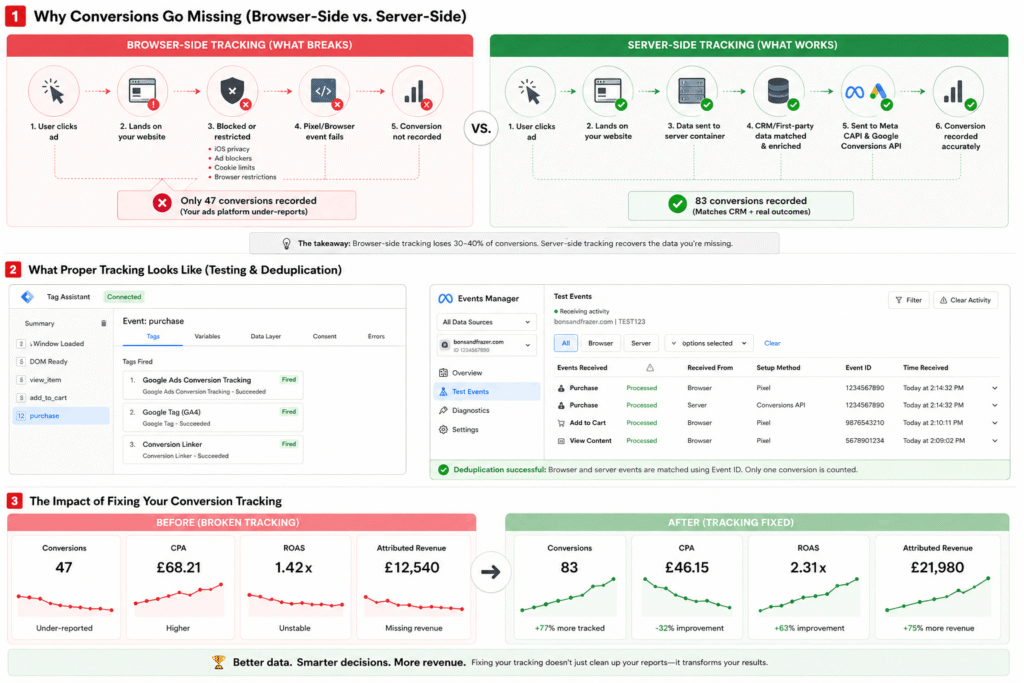
Almost every guide to server-side tracking is written by a company that wants to sell you server-side tracking. So they tell you it recovers “30% of your conversions”, that it’s “GDPR-proof”, and that you need it yesterday. Some of that is true. A lot of it is brochure copy.
This is the honest version. Server-side tracking moves the collection of your tracking data out of the visitor’s browser and onto a server you control. Below: exactly what that means, how it works, what it genuinely recovers (with real numbers, not marketing ones), what it costs, the five ways to set it up – and the question most guides skip entirely: whether you actually need it at all.
What is server-side tracking?
Traditional tracking is client-side: a piece of JavaScript runs in the visitor’s browser and sends data straight to Google, Facebook or your analytics tool. It’s easy to set up, which is why almost everyone uses it – and it’s increasingly unreliable, because the browser has become a hostile environment for tracking code.
Server-side tracking changes who does the sending. Instead of trusting the browser to deliver the message, the data passes through a server you own, and that server delivers it. The browser is an unreliable narrator. Your server isn’t.
Left: browser pixel blocked by iOS and ad blockers. Right: server-side reaches the platform directly.How does server-side tracking actually work?
Step by step, here’s the journey of a single conversion:
- 1The visitor acts – they buy, book, or submit a form. A lightweight tag fires in their browser as normal.
- 2The event goes to your subdomain, not to Google or Facebook. Because
data.yoursite.comis your own first-party domain, ad blockers and browser privacy controls don’t treat it as a third-party tracker to block. - 3Your tagging server processes it. This is the “server container” – normally server-side Google Tag Manager running on cloud infrastructure. It receives the raw request, turns it into a clean event, adds first-party data, and removes duplicates.
- 4It forwards the event to each platform via API – GA4, Google Ads (Enhanced Conversions) and Facebook (the Conversions API) – server to server, with no browser dependency.
The jargon you’ll meet: the server container is the processing hub; clients are the adapters that translate incoming requests into events; the first-party subdomain is what keeps the whole thing out of the blockers’ crosshairs. You don’t need to memorise any of it – but if a provider can’t explain these four steps in plain English, find another provider.
Client-side vs server-side tracking: what’s the difference?
| Client-side | Server-side | |
|---|---|---|
| Where data is collected | In the visitor’s browser | On a server you control |
| Blocked by ad blockers / ITP | Yes, frequently | Largely no (first-party subdomain) |
| Data accuracy | Partial – misses 30-40% in many accounts | Close to complete |
| Setup effort | Low | Moderate to high |
| Ongoing cost | Effectively free | Hosting + maintenance |
| Control over data | Little – it leaves your hands instantly | Full – you decide what’s sent |
| Best for | Page views, upper-funnel events | Conversions: purchases, leads, bookings |
You don’t choose one or the other. The right setup runs both: the browser handles lightweight upper-funnel events, the server handles the conversions that actually drive your bidding. More on that in implementation.
Why server-side tracking suddenly matters
None of this was true ten years ago, when client-side tracking worked fine. It broke gradually, then all at once. Each browser update, each privacy feature, each iOS release removed another slice of your data – quietly, with no error message. Your pixel still reports “no errors”. It just sees less and less of what’s actually happening.
Server-side tracking exists because the browser stopped being a reliable place to collect data. It’s not a growth hack; it’s damage control that happens to unlock growth. Setting it up and maintaining it is our server-side tracking service.
The real benefits (and which ones are oversold)
1. More accurate data (the real one). You recover conversions the browser was dropping, so your reports finally reflect what your business actually did. Everything else depends on this.
2. Better algorithm performance (the one that makes you money). This is the benefit most guides bury. Google’s Smart Bidding and Facebook’s delivery are machine-learning systems trained on the conversions they can see. Feed them complete data and they optimise against your real customers instead of a biased sample. Accurate reporting is nice; better bidding is what grows revenue.
3. More control over your data. You decide what leaves your server and what doesn’t – genuinely useful for regulated or sensitive sectors.
4. Privacy compliance (real, but conditional). First-party, server-collected data can align better with GDPR – if you pair it with proper consent. It is not automatically compliant. See the myth section.
5. “A faster website” (oversold). Moving heavy tags off the browser can shave a little load time. It’s a nice side effect, not a reason to switch. Anyone leading with this is reaching.
How much data do you actually recover?
Here’s the honest part nobody selling you a platform will say: the number depends entirely on how broken your setup was to begin with. A clinic taking bookings on a separate subdomain will recover far more than a clean single-domain Shopify store that was already tracking well. The “30%” headline figure is a best case sold as an average.
Want to measure your own gap before spending a penny? Pull your last 30 days of actual sales from your CRM, then compare to what Google Ads and Facebook report for the same period. If either platform sits below ~70% of your real figure, you have a recovery opportunity worth acting on. Here’s what that looked like for one client.
We partnered with a private scanning clinic that ran a Facebook campaign for three months prior to consulting with us — a campaign that indicated a continuous loss on every metric in Ads Manager. The client used a subdomain booking application, so the Facebook Pixel recorded ad clicks but never received information regarding subsequent bookings. Their Event Match Quality Score stood at 4.2.
Upon implementing server-side CAPI and pulling booking data directly from their backend — closing the subdomain tracking gap — reported conversions increased by 38% in the first four weeks. Event Match Quality improved to 8.1. The campaigns remained unchanged. Spend remained unchanged. Patients continued to book — the system simply could not measure them.
Server side tracking for Meta (Facebook and Instagram) ads
Fix Meta before Google if you can only afford one. This is the part most guides skip. Meta advertising works by identifying people; Google Search largely works by identifying intent. When iOS App Tracking Transparency and Safari’s cookie limits cut browser signal, Meta lost far more than Google did, because a large share of Google Search conversions still arrive with a click ID attached. So if you run both platforms and have budget to do one properly, do Meta. The uplift is bigger and it shows up faster.
The mechanics are covered above — see how it works, the four components of a complete setup, and the clinic that went from 4.2 to 8.1 Event Match Quality. For the Meta-specific detail there is a full guide to Event Match Quality and CAPI, and if your Pixel reports “no errors” but the numbers feel wrong, start here.
Server side tracking for Google Ads
Start with Enhanced Conversions, not a server container. Enhanced Conversions sends Google a hashed email or phone number alongside the conversion, so it can match against signed-in users and recover what the tag missed. It needs no server container, it is quick, and for a lot of accounts it closes most of the gap on its own. The full server-side build recovers more — ad blockers, shortened cookies, abandoned sessions — but it costs real money and time, so read what it actually costs before committing.
Consent Mode v2 is not optional here. If you advertise to UK or European users, Google expects consent signals passed with your tags; without them you lose conversion modelling and audience features. That is a self-inflicted data loss on top of the one you set out to fix. Setup is covered in Consent Mode v2 and your Google Ads conversions. If conversions have already stopped recording, work through the five-step diagnosis first — server side tracking will not fix a tag that was never firing.
The honest drawbacks
Complexity. This isn’t a plugin you switch on. It needs someone who understands tagging, APIs and consent to set up and validate properly.
Cost. There’s hosting, and there’s the bigger cost: the time to build and test it. (Full breakdown below.)
Maintenance. Platforms change their APIs; consent rules evolve. A server-side setup is something you maintain, not something you finish.
Deduplication risk. Run the browser pixel and server-side together without a shared event ID and you’ll count the same conversion twice – flattering numbers that quietly mislead your bidding. Getting dedup right is non-negotiable.
Vendor lock-in. Managed providers make setup easy, but your tracking then lives in their system. Convenient until you want to leave. Worth weighing before you commit.
What server-side tracking actually costs
Self-hosted (Google Cloud / Cloud Run). Maximum control, no third-party in the chain. You pay for cloud infrastructure – providers commonly cite figures around €120/month for a baseline – plus the expertise to run it.
Managed providers. Tools like Stape and TAGGRS host the server container for you, with entry pricing advertised from roughly €25/month. Cheaper and faster to start; the trade-off is the lock-in noted above. (Pricing changes – check current rates before budgeting.)
Agency-managed. The build, the testing and the ongoing maintenance bundled into one fee – sensible if you’d rather not own the technical risk. It’s how we set it up for our own clients, server-side tracking included in the account from day one.
Five ways to implement server-side tracking
1. Server-side tag management (sGTM). The mainstream route. A server-side Google Tag Manager container receives events and routes them to GA4, Google Ads and Facebook. Best balance of control and manageability.
2. Direct server-to-server APIs. Your server sends conversions straight to each platform’s API – Google’s Enhanced Conversions, Facebook’s Conversions API. Often used alongside sGTM for the events that matter most.
3. Built-in analytics SDKs. Some analytics platforms ship server-side SDKs (PHP, Java, C#, etc.) you call from your backend. Clean if you’re committed to one platform.
4. Hybrid. Client-side for UI and upper-funnel events, server-side for transactions and sensitive data. In practice, this is what most good setups actually are.
5. Server log imports. Feed raw web-server logs into your analytics. No client code needed, but limited – fine for basic analytics, not for ad-platform optimisation.
For a typical Google Ads and Facebook advertiser, a complete setup combines four things:
What a complete tracking solution looks like
Server-side Google Tag Manager (sGTM)
A cloud-hosted server container that sends events from your site to Google Ads via Enhanced Conversions and to GA4 via server-side tags. Your core conversion events become completely server-dependent — the browser is out of the loop for the conversions that matter.
Meta Conversions API (CAPI)
Sends server-side purchase and lead events directly to Facebook — in addition to your browser pixel. The pixel handles page views and upper-funnel events. CAPI handles conversion events that affect campaign optimisation. Running both requires deduplication via a shared event ID — otherwise the same conversion is counted twice.
Consent Mode v2
Properly integrated with a Google-certified CMP so that when a user declines consent, tags default to denied, consent signals update dynamically, and modelling activates for declined-consent users. This creates the greatest possible measurable view of your business constrained by current privacy law.
First-party data enrichment
Send additional customer identifiers — hashed email, phone number, first name, last name — with your conversion events to increase Google’s Enhanced Conversion match rates and Facebook’s Event Match Quality. The more accurately each platform can connect your events to logged-in customers, the better the algorithmic learning.
Do you actually need server-side tracking?
Here’s the test most guides won’t give you, because the honest answer is sometimes “not yet”:
You can probably wait if you spend under roughly £1,000-2,000/month on ads, your checkout and site sit on one clean domain, and your platform numbers already track within ~10-15% of your CRM. Fix the basics first; server-side tracking won’t rescue a setup that isn’t leaking much.
You’ll benefit most if you spend meaningfully on Google or Facebook, your audience skews iOS, you take bookings or payments on a subdomain or third-party platform, or you rely on Smart Bidding and CAPI – all situations where missing data directly costs you performance, not just reporting tidiness.
Server-side tracking, GDPR and consent (the big myth)
This is the most dangerous misconception in the whole topic. Because the data flows through your server, some assume it sidesteps cookie banners and consent. It doesn’t. Under UK GDPR and the ICO’s guidance, what matters is whether you have a lawful basis to process someone’s data – not which machine does the processing.
Used properly, server-side tracking and Consent Mode v2 work together: the server captures what you’re permitted to, consent signals govern what’s sent, and modelling fills the gap for users who decline. That’s more robust and more compliant than a sprawl of browser tags. But “more private when done right” is the opposite of “a way around the rules”.
The algorithmic impact of complete conversion data
You’ve probably already noticed how server-side tracking affects targeting — but this is often overlooked while most advertisers focus on it solely as a means of getting accurate numbers and seeing real ROAS.
The biggest impact of server-side tracking is on the algorithms within both Google’s Smart Bidding and Facebook’s delivery systems. When you provide complete and accurate conversion data into these algorithms, the machine learning loop closes successfully. The system now recognises all of your customers rather than a small sample. It recognises the patterns that occur at the end of the funnel leading to purchase or lead generation and directs spending towards the audiences and queries that drive ROI.
Server-side tracking doesn’t make your campaigns seem like they’re performing better. Your campaigns will actually perform better — for the first time — since they’ll be optimised using 100% of available data.
Within approximately six weeks of implementing server-side tracking for our clients, we’ve seen three outcomes consistently:
While the amount of improvement varies by client, industry, and niche, the direction is always positive.
Frequently asked questions
What is server-side tracking, in one sentence?
It’s collecting your analytics and conversion data on a server you control instead of in the visitor’s browser, then forwarding it to Google, Facebook and GA4 via their APIs – so the data no longer depends on what the browser allows.
Is server-side tracking legal and GDPR-compliant?
Yes, but it’s not a way around consent. It changes where data is processed, not whether you need permission. Paired with Consent Mode v2 and a certified consent platform it’s more privacy-robust than browser tags; used to bypass consent it carries the same legal risk as before.
Does it replace the Meta Pixel or Google Ads tag?
No – you run both. Browser tags capture page views and upper-funnel activity; server-side captures bottom-of-funnel conversions. Running both with deduplication via a shared event ID gives the most complete picture without double counting.
How much data will it actually recover?
Vendors quote 30%, and 10-40% appears across the industry, usually unsourced. In our client work we see a more conservative 15-25%, depending on traffic mix and how badly the original setup was leaking. Even the low end is significant on a meaningful budget.
Does server-side tracking slow my website down?
If anything it can speed it up slightly, because heavy third-party tags move off the browser onto your server. The faster-website benefit is real but small – it shouldn’t be your main reason for switching.
Do I need a developer to set it up?
You need someone who understands tagging, APIs and consent – whether that’s an in-house developer, a specialist, or an agency. The risk isn’t the initial build; it’s validating deduplication, match quality and consent behaviour afterwards.
How long does it take to implement?
A standard setup – server-side GTM, Meta CAPI and Consent Mode v2 with first-party enrichment – takes an experienced practitioner one to two days. Custom checkouts or multiple payment processors take longer. Testing matters more than the build.
Why do my Google Ads and Facebook numbers still not match after fixing tracking?
That gap is expected and isn’t a remaining tracking fault – each platform measures differently. For why the numbers never align perfectly and which to trust, see our conversion tracking discrepancies guide.
Not sure whether your tracking is leaking – or whether server-side is even worth it for you? We’ll audit your setup and tell you straight, no sales pitch.
Get a free tracking audit →Bons & Frazer is a specialist server-side tracking agency and builds it into every account we manage, alongside Google Ads and Facebook Ads management for Norfolk businesses. No contracts, no account managers.
Jamie Frazer is a co-founder of Bons & Frazer, a performance marketing agency based in Norwich specialising in Google Ads, Facebook Ads, and tracking infrastructure for service businesses. He has managed paid media and attribution strategy for clinics, travel operators, and e-commerce brands across the UK and internationally.